Configuring Networks
Use the Network page of the CygNet Redundancy Editor to configure the different networks in your redundancy environment. You can specify multiple networks (for example, business, production, and test) supporting redundant relationships across a local or wide network.
|
Click the thumbnail to see an example |
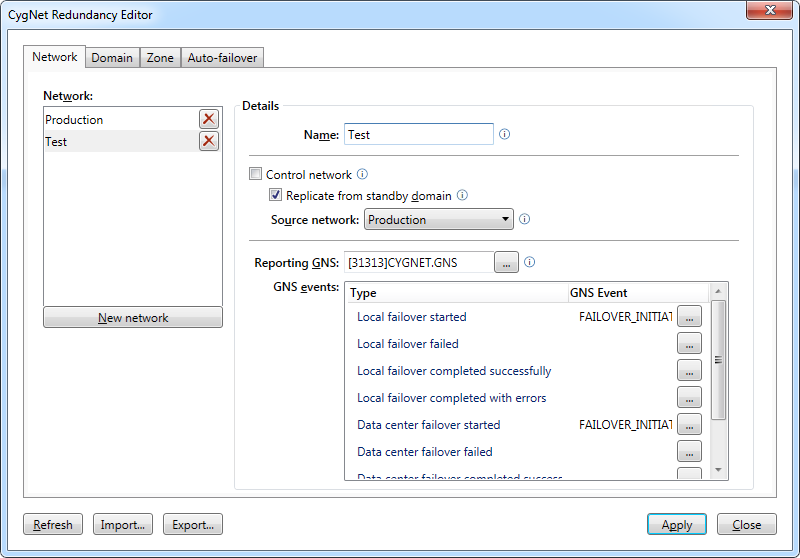
Network Properties
The following table lists and describes the Network page properties.
| Parameter | Description |
|---|---|
| Network | |
|
New network |
Click New network to configure a new network in your redundancy environment. Click X to remove the associated network. |
|
Details |
|
|
Name |
Specify a unique name for the network (20 characters or less). |
|
Control network |
Check to indicate that this network is the control (or main) network for this redundant set. This is the network from where you will poll field devices and contains your live data. It is the only network where you may configure data-center redundancy. It is possible to create multiple control networks that all replicate to one or more replication networks. If you delete the last remaining control network in a redundant set, none of the remaining networks will become the control network. Any new control networks will need to be manually configured. Note: There can be only one active domain for the control network. |
|
Replicate from standby domain |
Check to indicate that this network replicates from the standby domain and thereby reduces impact to active services on the control network. There is always a cost for a source service to send data to a replicated service. In a hypothetical setup where you might have local redundancy, data-center redundancy, and multiple networks, you could have four services replicating from a single source service, which is also the active service that's polling field devices. By setting this option you can reduce impact to active services by forcing other networks to replicate from the standby server on the control network, rather than from the active server on the control network. That way only the locally redundant site and the data-center redundant site are replicating from the active site. Note: This option is not available for the control network. |
|
Source network |
Specify the source network from where data is replicated for this network. The source can be any network in the redundancy environment, including the control network. |
|
Specify the name of the General Notification Service (GNS) that will report failover events. Click … to select the desired GNS. Note: The Reporting GNS cannot be owned by an RSM specified in this redundancy set. See Sending Failover Notifications for more information. |
|
|
GNS events |
Specify the GNS Event ID for each GNS Type. The GNS Event ID must be defined in the selected reporting GNS. GNS event types include:
Click … to select a GNS ID from the list. |


